Optimización de corte ·
OEF: make the most of space in your shape optimizations
Glass shapes can fit together to make better use of a sheet. Discover how OEF works and try the new online demo with catalogue shapes and DXF files from our library.
A triangle, an ellipse or an irregular piece leaves free space inside the rectangle that contains it. When each shape is planned separately, some of that space remains unavailable to the other pieces. What if we could make use of it by combining several shapes?
That is the idea behind OEF, our Special Shape Optimizer: studying the geometry of the pieces and looking for groupings that make better use of the glass. You can now try it in Vidrioservice’s new online demo, without installing any software.
How shapes are combined
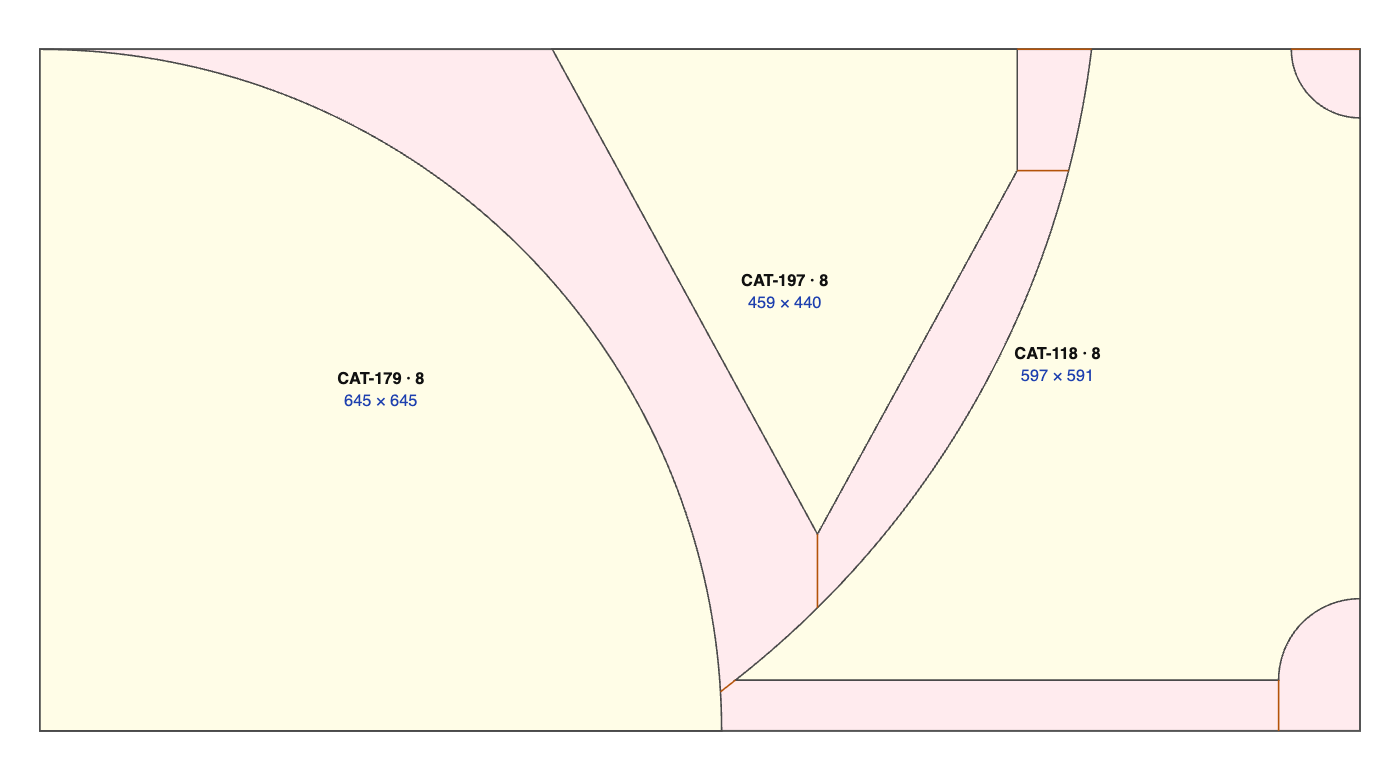
Think of two triangles that complement each other along their sloping sides. By rotating one and moving it closer to the other, they can occupy a more compact rectangular envelope together than if we reserved a separate rectangle for each one. OEF looks for these opportunities among different shapes, with different sizes and quantities as well.
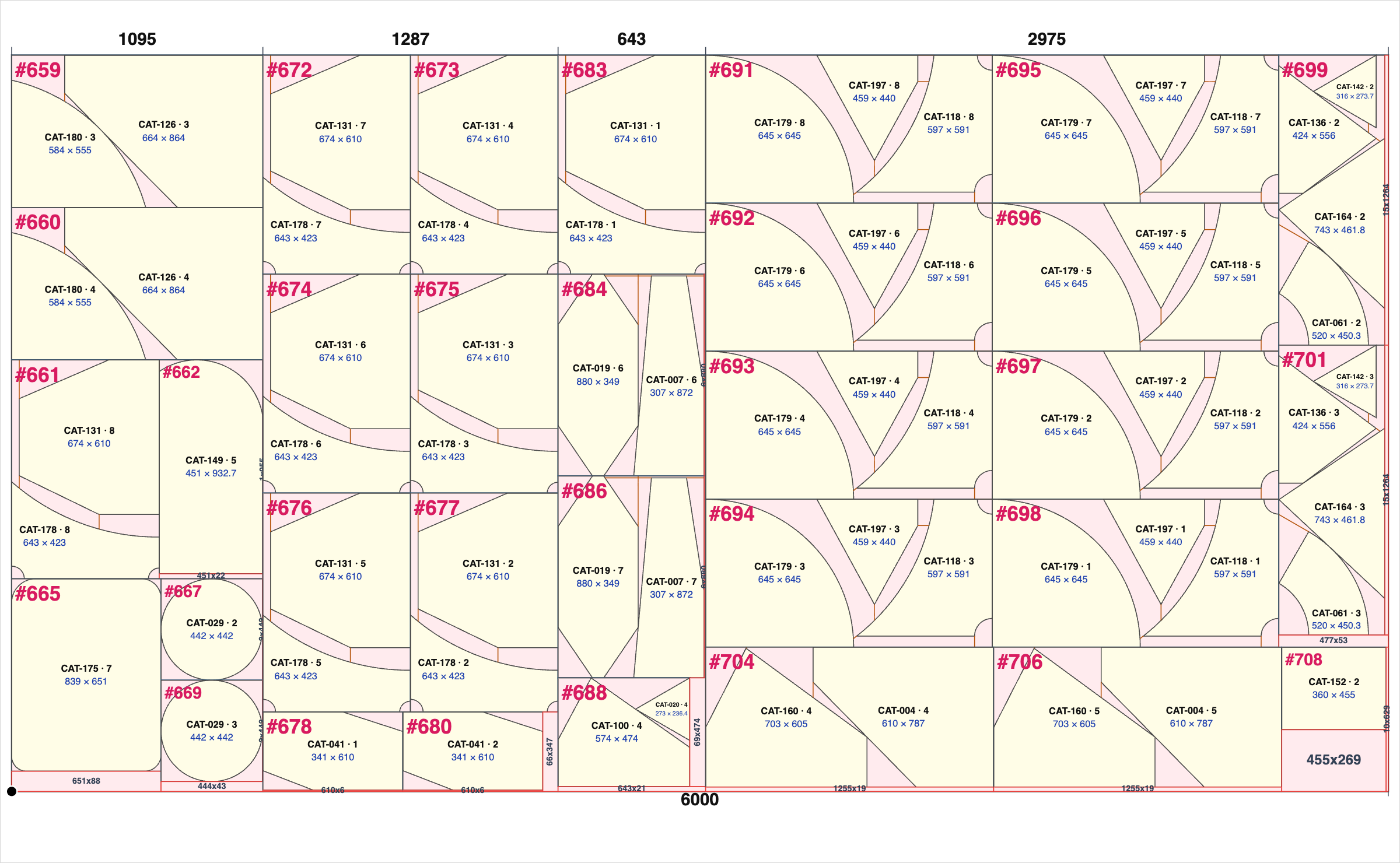
We call the set of one or more pieces inside a rectangular envelope a primitive. OEF prepares these groups, and the exhaustive optimizer looks for ways to distribute them across the glass sheets. Pieces that are best kept separate also take part: they can help fill the spaces left between groups.
Each piece of glass retains its identity. In the result, you can identify its shapes and references even when several pieces share the same primitive.
Making the most of the material while planning for breakout
A compact layout must also be reviewed from the perspective of work at the table. Narrow wedges, points and remnants between two shapes affect how the pieces are removed. That is why OEF includes breakout parameters and displays auxiliary cutting lines on the plan.
You can adjust the protective band around the shape, the minimum angle, the minimum breakout clearance, the primitive’s outer margin and the maximum number of pieces each group can contain. The OEF band and margin apply to catalogue and DXF shapes; standard rectangles retain their dimensions.
Allowing more space for breakout can reduce geometric yield. The demo lets you vary the parameters and compare the plans to assess this trade-off. The PDF also helps you review remnant removal with operators: behaviour at the table depends on the pieces and working conditions.
A complete test in three steps
1. Prepare the pieces. The demo starts with an editable example containing 123 references and 984 pieces. You can review their drawings, change dimensions and quantities, remove references, or add rectangles and catalogue shapes. You can also choose DXF files from the example library we provide and adjust their scale while preserving proportions. The limit is 1,000 pieces per optimization.
2. Adjust OEF and the glass format. Define the grouping and breakout parameters, as well as the dimensions of the stock sheet. If you have an initial remnant, you can enter its width and height: when this option is enabled, it will be used as the first sheet. If your pieces or parameters prevent it from being used effectively, the application will explain what to review.
3. Submit the test. The demo automatically prepares and uses the valid primitives, without asking you to select them one by one. The calculation enters the server queue and, when it finishes, you receive the PDF of the best result found in terms of yield by email. You can close the page while it runs and later check the status and result in “My optimizations”.
What to look at in the result
Review the sheets used, yield, primitive composition and the remnants left by each grouping. The PDF inventory includes a thumbnail of each shape so you can match its drawing to the reference. The plans show the pieces and auxiliary cutting lines, allowing you to study the solution in detail.
The scope for improvement depends on the geometries, dimensions, quantities and selected parameters. A set of complementary shapes offers different opportunities from one made up of almost rectangular pieces. To compare two results, keep the same inventory and glass format, and also check the margins and breakout conditions.
Try OEF with different combinations
If you already have active access to Showcase, open Demo → OEF Demo. The test includes up to ten OEF optimizations per account, with a quota separate from that of the standard optimizer demo. You can start with the example and change one condition at a time to understand how it affects the result.
Don’t have an account yet? Request access to the demo, confirm your email and create your password. You will have access for seven days from activation. When you log in, allow the browser to share your location, as requested for demo access.
Explore the shapes, adjust the parameters and check the result on the plan. We would be interested to hear which combinations you have tried and what opportunities you find for your everyday work.